Tower WMS — in private evaluation
Marked cargo in. Ticketed cargo out. Billable days in between.
The system of record for industrial-warehousing brokers: receiving, storage-day billing and release control for project cargo — ingots, reels, bundles, heat-numbered stock.
We walk your receiving-to-release flow on fictional data.
CONFIRMED · 6 ITEMS RELEASED
- Customer
- DEMO Metals Co.
- Project
- DEMO-PRJ-2026-001
- Cargo profile
- Ingots
- Physical warehouse
- DEMO Yard A
- Container #
- DEMO-CN-8842
- Mark
- DEMO-ING-7003
- Heat / lot
- DEMO-H-90412
- Net wt
- 12.480 MT
- Storage period
- 2026-05-14 → 2026-07-15
- Billable units
- 52 days
- Released by
- Signature on gate copy
Illustrative composite · fictional data
The workflow
Five moments, one record.
Each step works from the record the steps before it wrote. The work downstream starts from that record.
-
01
Receive
Every item lands in the ledger carrying its own marks — a mark, a SKU, a heat or lot number. The packing list asks for what that cargo profile requires — container number, marks, weight, dimensions, a CoA reference — and won’t post the list while any line is missing them. Receiving then records the in-date the storage clock bills from. When the truck is at the door, scan the container instead of typing it: the expected pieces inside come into the warehouse with it, and scanning the same box twice is harmless.
CONTAINER DEMO-CN-8842 · 14 ITEMS · 29.120 MT
-
02
Store
Every item sits in a container, under a project at one facility, with a status of its own. Put a hold on an item and it cannot leave on an exit ticket.
DEMO YARD A · STATUS WAREHOUSE · HOLD 1 · EXC 1
-
03
Clock
Storage days run from the in-date, and free days, receipt and release are one calculation. Operations and finance read the same clock, which is usually the whole month-end argument.
IN 2026-05-14 · FREE 10 · AS OF 2026-07-15 · BILLABLE 52 D
-
04
Release
Cargo leaves on a numbered exit ticket built from the marks actually in stock. The system prints it — carrier, driver, truck, seal and broker BOL as entered at loadout, and every released mark — and it carries your product name, not ours. The web app carries the rest: your product name and colors throughout, once your team is signed in. Confirm the loadout and the inventory moves — unless the lane has no live rate, in which case the system refuses to confirm it until one is in place. A cancelled ticket still prints, stamped VOID — CANCELLED.
TICKET EX-DEMO-PRJ-2026-001-0004 · 6 ITEMS OUT · CONFIRMED
-
05
Bill
Storage and outbound-handling charges are generated from the events already recorded — at the moment a loadout is confirmed, or in one monthly run — then reviewed by a person before invoice handoff. Cost and revenue sit on the same charge line. Finance reviews each charge line with its container, mark and rate, and every approval is stamped with a name. Approved charges export in CSV or Excel for your accounting team, each customer’s lines under its own invoice number.
INVOICE INV-202607-0001 · STORAGE · 52 D · MARK DEMO-ING-7003
Scanning runs the length of that flow: the same container number or item mark resolves at receiving, on a walk-the-floor lookup, and against the exit-loadout checklist. Use a wedge gun if the floor has one, or the camera on a phone or tablet if it doesn’t — nothing to install, and the camera image is read in the browser rather than uploaded. Cargo that arrives without a label anyone trusts can be given one: ten QR labels to a Letter sheet, on plain paper or 4″ × 2″ stock. A phone camera reads those labels; a wedge gun reads them if it is a 2D imager.
Evidence
Two screens, at full size.
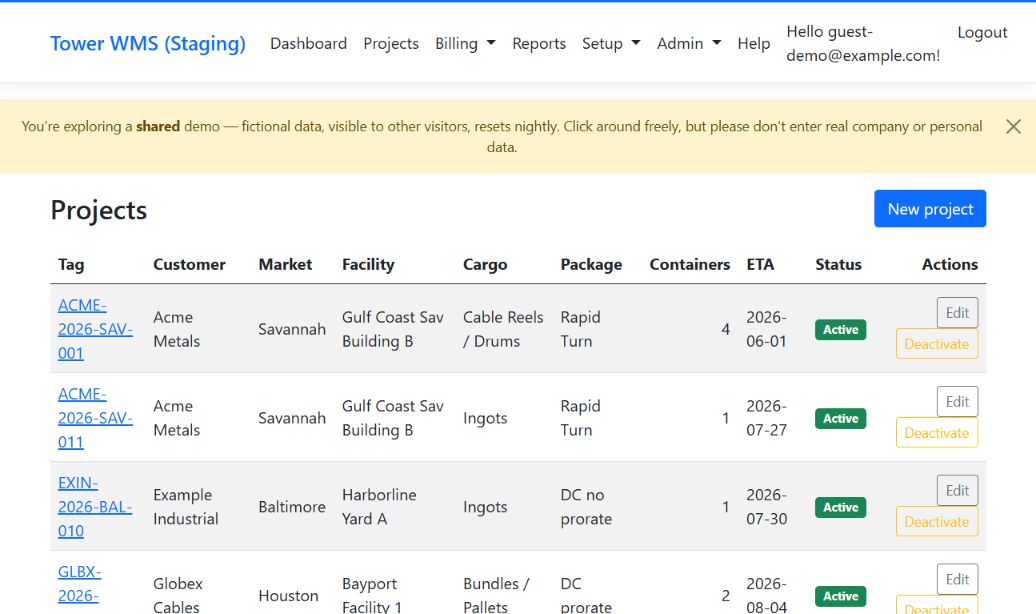
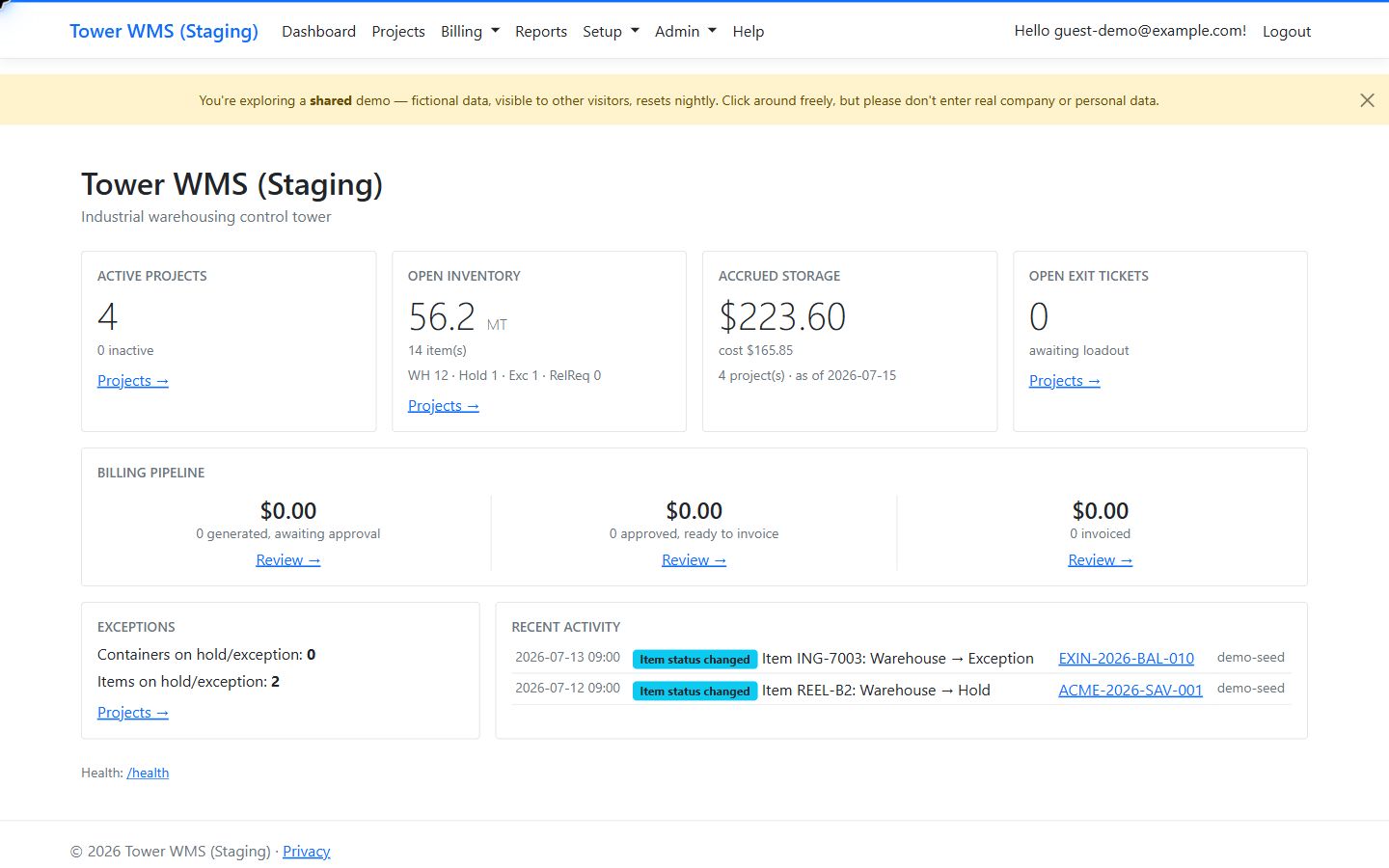
Captured from the Tower WMS demonstration environment. Each frame below is a fixed 1:1 crop, never shrunk; the full capture behind the link is fitted to your window. Every identifier is fictional seed data.
Capture 01 — Projects

Illustrative interface · fictional data
- Every project carries its operating lane on one row: customer, market, facility, cargo profile, billing package, expected container count and ETA.
- The project tag is the identity the marks, tickets and charge lines all point back to.
- The facility is the building the cargo sits in, tracked separately from the warehousing company you contract with.
Open the full capture of the Projects page; illustrative interface with fictional data
Capture 02 — Control tower

Illustrative interface · fictional data
- Open inventory is counted in items and metric tonnes, the same units storage is billed in.
- Accrued storage is stated as of a date, because the number moves every day.
- Warehouse, hold and exception counts sit under the total, where an item flagged as an exception shows up well before month-end.
Open the full capture of the dashboard; illustrative interface with fictional data
Fit
Keep your spreadsheets. Tower WMS gives them a system of record to reconcile against.
Most brokers running marked cargo already have a system that works. These are the four moments where Tower WMS does something different. Not better at everything. Different at four things.
Moment
Today — Excel + email
With Tower WMS
Receiving marked stock
Today — Excel + emailA receiving tab per project, built by someone who knows exactly which columns matter, holding every mark the paperwork carried.
With Tower WMSThe same marks, entered once into a ledger that the release and the charge line both read from. When the paperwork turns out to be wrong, the container and item details can be corrected in place — and each correction is logged under the name of whoever made it, with a reason required whenever it changes the warehouse receipt date.
Storage-day billing
Today — Excel + emailA day-count formula refined against years of real invoices, handling free days, prorations and the customer who is always the exception.
With Tower WMSThe same calculation for everyone, priced from a rate card keyed on customer, market, facility and cargo type — one lane, reused by every project that runs down it, carrying your cost alongside your revenue. Free days and proration come from each project’s billing package.
Releasing cargo
Today — Excel + emailAn email thread with the release attached, forwarded to the gate; everyone on that thread knows what was agreed.
With Tower WMSA numbered exit ticket printed under your own product name, and inventory that moves the moment the loadout is confirmed.
Month-end close
Today — Excel + emailA concentrated few days rebuilding the month from tabs, threads and memory — accurate, because a person went through it.
With Tower WMSStorage and outbound-handling charges are assembled from the events — at each loadout, or in one monthly run you start — and those days go to reviewing charge lines. The rest of the month stays in your spreadsheet.
Four reports ship with the system — customer inventory, warehouse inventory, open exceptions, and required-data gaps — each on screen and as CSV or Excel. The required-data report flags open items missing a field their cargo profile requires — a weight, a CoA reference — before anyone downstream asks for it.
What Tower WMS is not
Not pick-and-pack. Not parcel. Not a TMS. If the cargo doesn't carry marks or heat numbers, Tower WMS is the wrong tool.
Status
Currently in private evaluation.
Tower WMS is in private evaluation. No pricing is published and no general-availability date has been set.
Tower WMS is a hosted web application. Your team signs in from a browser; the only thing to install is a TOTP app — or nothing at all, if your team’s password manager generates one-time codes — because administrator accounts require a second factor.
Accounts are created by an administrator — there is no public sign-up — and each broker's data is isolated per tenant.
An administrator can export the company’s data to Excel or CSV, self-service.